
Unlocking Bloom Filters: Lightning-Fast Data Structures for Read-Heavy Systems

Unlocking Bloom Filters: The Ingenious Solution for Lightning-Fast Malware Detection, Spell Checking, and Beyond

Ever wondered how Google Chrome or other browsers identifies malicious websites in a flash?
Or How any of the apps like Word or Grammarly, quickly tells you if any spelling is wrong?
Etc etc.
Take a moment and think🤔
What data structures or tools comes to your mind for the above usecases?
You might think of HashMap or HashSet or you might think I’ll throw up a Redis cluster for cache and store these details, right.
Before we delve into further discussion, let’s consider the website use case and do some math.
Website Use Case
Each website’s URL consists of 75–120 characters. Mean character size of 76.97.
1 character = 1 byte
76.97 character * 1 byte = 76.97 bytes
Total websites: 1.13 billion * 76.97 bytes = 86.9761 GB
Or let’s take the case of, Active websites: 200 million * 76.97bytes = 15.39400 GB
Given these estimates, using traditional data structures like HashMap or HashSet to hold this data becomes impractical.
So what about Redis cache?
Even employing Redis cache would demand significant memory resources:
For 1.13 billion websites:
Average character size: 76.97 bytes
Memory usage for URLs: 1.13 billion * 76.97 bytes ≈ 87.09961 GB
Redis overhead assumption: 30%
Redis memory usage: ≈ 87.09961 GB * 1.3 ≈ 113.21949 GBFor 200 million active websites:
Average character size: 76.97 bytes
Memory usage for URLs: 200 million * 76.97 bytes ≈ 15.39400 GB
Redis overhead assumption: 30%
Redis memory usage: ≈ 15.39400 GB * 1.3 ≈ 20.0122 GB
Challenges and Solutions
Handling 3.22 billion daily active users(for Google) accessing Redis caches would introduce significant overheads, especially in a read-heavy system where data retrieval is frequent:
Memory Overhead: Increased cache size requiring more memory.
CPU Overhead: Higher processing demands for cache operations
Network Overhead: Elevated traffic between clients and Redis servers.
Latency Overhead: Potential delays due to resource contention.
Scaling Challenges: Need for horizontal scaling and load balancing.
Data Consistency: Ensuring reliability amidst high concurrency.
Monitoring and Optimization: Vital for identifying and addressing bottlenecks.
Addressing these challenges requires careful planning, robust infrastructure, and ongoing optimization.
So how does Google Chrome or other browsers address this issue?
Addressing these challenges necessitates careful planning, robust infrastructure, and ongoing optimization. But how does Google address these issues efficiently? They leverage Bloom Filters.
What’s a Bloom Filter?
Bloom filter is a probabilistic data structure, that quickly checks if an item might be in a set. It’s fast but may give occasional wrong answers i.e. false positives.
How It Works:
Setup: Start with a list or array of zeros (bits).
Hashing: Use multiple hash functions aka k-hash function to map each item to different positions in the list.
Adding Items: When adding an item, prepare its k-hashes and set the bits in the list that the hash functions point to.
Checking Membership: To check if an item is in the set, see if all the bits that the hash functions point to are set.
Example (Malicious Websites Detection):
Setup: We have a Bloom filter with 10 bits and three hash functions. Initial array of Bloom filter: [0, 0, 0, 0, 0, 0, 0, 0, 0, 0]
Adding Malicious Websites:
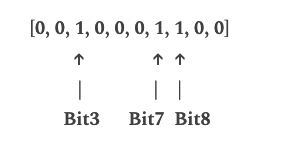
“malicious1.com”:
Got hash values as 3, 7, and 8, so we set those positions value as 1.
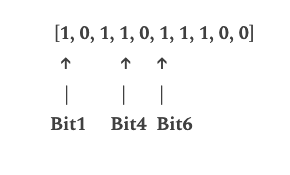
“malicious2.org”:
Got hash values as 1, 4, and 6, so we set those positions value as 1.
Visualization when someone hits a URL in google chrome:
Checking Membership:
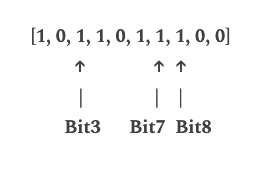
“malicious1.com”:
Got hash values as 3, 7, and 8. All corresponding bits are set in the array, indicating a possible match.
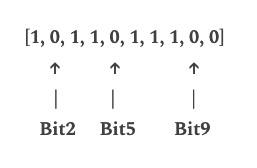
“benign.com”:
Got hash values as 2,5,9. No corresponding bits set, indicating it’s likely not in the set.
“benign2.com”:
Got hash values as 1,3,6. Found bits set in the array, as those were set by “malicious1.com”(set 3,7 and 8 as 1 in array) and “malicious2.com”(set 1,4 and 6 as 1 in array), so this is a case of false positive.
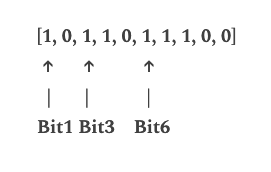
This illustrates how Bloom filters quickly identify potential matches in a set, making them useful for tasks like malware detection.
Let’s say Google is creating an array of size 20 million (actual size is unknown) to create a Bloom filter to map the malicious websites.
The calculation would be as follows:
Total size in bytes
= (Size of one bit) * (Size of the array)
= (1 byte) * (20,000,000 bits)
= 20,000,000 bytes
Total size in MB ≈ 20,000,000 bytes / 1,048,576 bytes/MB ≈ 19.073 MB
So, the size of the bit array would be approximately 19.073 MB, that’s basically peanuts
As you can see, with an array size of 20 million bits, the size of the bit array is approximately 19.073 MB, which is peanuts.
So google stores this bloom filter in your browser cache irrespective of mobile or computer, same goes for other web browsers.
The bigger the Bloom filter array, the better the results.
What are the advantages for Google and other companies, for holding this cache on the client end?
Benefits of holding this cache on the client end include:
Bloom filters are compact, stored locally to reduce reliance on server communication, enhancing browsing speed.
Workload Reduction: Pre-filtering safe websites with Bloom filters lessens the burden on central servers, ensuring a more scalable system
Privacy: Operating locally, Bloom filters don’t transmit all URLs to servers, preserving user privacy by sending only potentially harmful website addresses for verification.
Other use cases for Bloom filters include:
Spell checkers: Efficiently identify misspelled words by filtering out potential candidates.
Cache management: Determine whether an item is in a cache without accessing the underlying storage.
Network packet routing: Quickly route packets based on predefined rules, reducing processing time.
Disadvantages of Bloom filter:
Despite their benefits, Bloom filters can yield false positives, requiring additional verification for flagged items.
Implementation:
It’s usecases made me curious and I have implemented a lightweight malicious websites detector project using bloom filter. Please feel free to play with it.
Key Features:
Map malicious websites into the system
Detect malicious websites when someone queries to find out
Link to the project:
https://github.com/pradipmudi/malicious-website-detector
Nothing fancy, built it from pure curiosity
Conclusion
Bloom filters offer an elegant solution to the challenges posed by read-heavy systems, providing lightning-fast operations with minimal overhead. By efficiently identifying potential matches in a set, Bloom filters enhance the performance of tasks such as malware detection, spell checking, and cache management. Embracing such innovative data structures not only optimizes performance but also streamlines resource utilization in modern computing environments, particularly for read-heavy systems.
Please let me know, your thoughts in the comments.
Happy learning! :)
Resources: